Getting API keys
You need to release a different API key for accepting payment and making payouts
Payment API key
- 1. Create a new Merchant account, or open the Merchant Setting tab in your existing merchant (skip to Step 5).
- 2. After creating a new merchant, go to Setup, enter your Website URL and Description, then click Submit.
- 3. Verify your domain using one of the available verification methods.
- 4. Wait for merchant moderation and approval.
- 5. Once approved, return to Merchant Setting to copy your Payment API Key and Merchant ID.
Payout API key
- 1. Open the Security section of your personal account
- 2. Bind two-factor authentication if you haven't already done it
- 3. Go to API
- 4. Generate - Payout key (Remember withdrawals will be temporarily blocked for 24 hour after generate new payout API key)
- 5. Done!
Request format
ENDPOINThttps://siteapi.firefox.vip/
All requests must be sent via POST method in JSON format.
Request must be signed
Access to the payment and payout APIs is allowed only after your IP address has been whitelisted.
Authentication
The authentication process is carried out by sending 2 HTTP headers:
Signature can be generated using MERCHANT NAME and PAYMENT API KEY
Example of signature generation in php(for payment key):
$micro_time = round(microtime(true) * 1000);
$merchant = 'merchant name'.$micro_time;
$payment_key = 'Payment api key';
$hmac = hash_hmac('sha256', $merchant, $payment_key, true);
Signature can be generated using User's UID from profile and PAYOUT API KEY
Example of signature generation in php (for payout key):
$micro_time = round(microtime(true) * 1000);
$user_uid = 'user uid'.$micro_time;
$payout_key = 'Payout api key';
$hmac = hash_hmac('sha256', $user_uid, $payout_key, true);
Different
Key APIs are used to accept payments and payouts
Request example
curl https://siteapi.firefox.vip/invoice-builder \
-X POST \
-H "merchant: 870b646d79ety663c8d66cc82c489738" \
-H "sign: 60458ed7901293c6519e4b38c4f997b469167ad61b31346537155b6f5188b7239bdggd" \
-H "timestamp: 1771823631014" \
-H "Content-Type: application/json" \
-d '{
"item_amount": "0.01",
"merchant_id": "870b646d79ety663c8d66cc82c489738",
"client_payment_currency": "BTC",
"client_payment_network": "BTC",
"period": "3"
}'
Getting started
Before starting work, make sure that you have released the api key
Getting API Key Selecting the type of integration
There are 2 types of integration
1. Invoice
This payment method is suitable for paying for goods with a specific amount.
You can specify the currency, then the payer can select the cryptocurrency and network on the payment page.You can also specify the crypto-currency and network immediately, then a crypto-currency address will be generated and you can give it to the client.
Once the client has paid, you will receive a notification - a webhook, which indicates the status, the payment amount and hash, as well as additional data (more details - Link )
If the client didn't pay, you will receive the cancel status.
If the client sent the exact amount, you will receive a paid status.
If the client sent a lower amount, you will receive the wrong_amount status.
If the client sent a higher amount, you will receive the paid_over status.
To allow the client to pay the rest, pass the parameter is_payment_multiple = true
On the payment page, the client will be notified that there is a surcharge to be paid. If the client doesn't pay the rest of an amount, you will receive a webhook with the wrong_amount status, when the invoice expires.
2. Static wallet
Suitable for balance top-up
You can create a static address in a specific currency and network. The address will be attached to the order_id
All transactions sent to this address will be credited regardless of the amount.
Creating an invoice
POSThttps://siteapi.firefox.vip/invoice-builder
Request
Query parameters
*- mandatory parameter
Either fiat_currency or client_payment_currency must be provided. Both fields can be filled, but at least one is required.
The invoice will have a specific cryptocurrency and address at the time of creation only if client_payment_currency parameter is a cryptocurrency and the client_payment_network parameter is passed (or a cryptocurrency has only one network, for example BTC).
Request example
curl https://siteapi.firefox.vip/invoice-builder \
-X POST \
-H "merchant: 870b646d79ety663c8d66cc82c489738" \
-H "sign: 60458ed7901293c6519e4b38c4f997b469167ad61b31346537155b6f5188b7239bdggd" \
-H "timestamp: 1771823631014" \
-H "Content-Type: application/json" \
-d '{
"item_amount": "0.01",
"merchant_id": "870b646d79ety663c8d66cc82c489738",
"client_payment_currency": "BTC",
"client_payment_network": "BTC",
"period": "3"
}'
payment_amount_usd: Amount actually paid by the client in USD (available only when client_payment_currency and client_payment_network are provided).
Response example
{
"success": true,
"message": "Invoice has been generated",
"data": {
"payment_id": "BGPTGWYGPWG4TBEDPBNVM5CUBVZ",
"payment_address": "1GT5stn4....R3VA5gPN",
"qrcode_url": "data:image/svg+xml;base64,PD94bWw........3ZnPgo=",
"payment_amount_usd": "71.40000000",
"payment_type": "invoice",
"order_id": "39422afd84af8fc",
"status": "active",
"period": "1",
"period_start_at": "2026-02-05 07:43:18",
"period_end_at": "2026-02-05 08:43:18",
"amount": "0.9",
"currency": "BTC",
"network": "BTC",
"url": "http://firefox.vip/pay/BGPTGWYGPWG4TBEDPBNVM5CUBVZ/payment"
}
}
Possible errors
Validation errors
Example responses:
If some parameter is required and not passed:
Response example
{
"success": false,
"data": {
"item_amount": [
"The item amount field is required."
],
"client_payment_currency": [
"The client payment currency field is required."
],
"client_payment_network": [
"The client payment network field is required."
]
},
"message": "Validation error"
}
Currency Not Available: Returned when the requested currency is not supported or not enabled for transactions.
Response example
{
"success": false,
"data": [],
"message": "Currency not available."
}
Validation Error: Returned when the provided amount is invalid. The amount must be greater than zero.
Response example
{
"success": false,
"data": {
"item_amount": [
"The item amount must be greater than 0."
]
},
"message": "Validation error"
}
If technical work occurs and the payment is temporarily unavailable, you can receive this error messages:
Response example
{
"success": false,
"data": [],
"message": "Gateway error"
}
Either fiat_currency or client_payment_currency must be provided. Both fields can be filled, but at least one is required.
Response example
{
"success": false,
"data": {
"currencymode": [
"The currencymode field is required when client payment currency is not present."
],
"client_payment_currency": [
"The client payment currency field is required when currencymode is not present."
]
},
"message": "validation"
}
Returned when the provided payer_email is not a valid email address.
Response example
{
"success": false,
"data": {
"payer_email": [
"Please enter a valid email address."
]
},
"message": "validation"
}
Returned when the subtract value is outside the allowed range (1–100).
Response example
{
"success": false,
"data": {
"subtract": [
"The subtract must be between 1 and 100."
]
},
"message": "validation"
}
Returned when the payment_accuracy value is outside the allowed range (0–5).
Response example
{
"success": false,
"data": {
"payment_accuracy": [
"The payment accuracy must be between 0 and 5."
]
},
"message": "validation"
}
Generate a QR-code
You can generate a QR-code for a static wallet address or for an invoice address. Scanning it, the user will receive the address for depositing funds.
Generate a QR-code for the static wallet address
POSThttps://siteapi.firefox.vip/qrcode-payment
Request
Query parameters
*- mandatory parameter
Request example
curl https://siteapi.firefox.vip/qrcode-payment \
-X POST \
-H "merchant: 870b646d79ety663c8d66cc82c489738" \
-H "sign: 60458ed7901293c6519e4b38c4f997b469167ad61b31346537155b6f5188b7239bdggd" \
-H "timestamp: 1771823631014" \
-H "Content-Type: application/json" \
-d '{
"payment_id": "BGPTGWYZ7EUH2ZVSLMXHJ7TLV15",
"merchant_id": "870b646d79ety663c8d66cc82c489738"
}'
Response example
{
"success": true,
"message": "QR code has been generated",
"data": {
"qrcode_url":
"data:image/svg+xml;base64,PD94bVEnKyW2lg5vZGQiIGQVaSaNfshgdfx....."
}
}
Possible error
This response is returned when the requested payment does not exist in the system.
Response example
{
"success": false,
"data": {
"error": 400
},
"message": "Payment not found"
}
Payment information
POSThttps://siteapi.firefox.vip/get-payment-info
Request
Query parameters
*- mandatory parameter
To retrieve the invoice status, you must provide at least both required parameter. If both merchant_id and payment_id are provided, the invoice will be identified using payment_id.
Request example
curl https://siteapi.firefox.vip/get-payment-info \
-X POST \
-H "merchant: 870b646d79ety663c8d66cc82c489738" \
-H "sign: 60458ed7901293c6519e4b38c4f997b469167ad61b31346537155b6f5188b7239bdggd" \
-H "timestamp: 1771823631014" \
-H "Content-Type: application/json" \
-d '{
"payment_id": "BGPTGWYZ7EUH2ZVSLMXHJ7TLV15",
"merchant_id": "870b646d79ety663c8d66cc82c489738"
}'
Response example
{
"success": true,
"message": "Payment Information retrived",
"data": {
"transactions_count": 1
"transactions": {
"payment_id": "BGPTGWYS57TJWBD2XKMLGZBJ9W8",
"date_time": "2026-01-29T13:58:13.000000Z",
"fee": "0.0561115224",
"mark_as": "0",
"receiving_address": "0x4838B8.....F73cE8B0BADhjie",
"from_info": {
"txid": "0xace368c40....4arkdncva0bb1ff09fa",
"payment_id": "BGPTGWYS57TJWBD2XKMLGZBJ9W8",
"from_addr": "0x0e.....d85653673ba2b71773",
"to_addr": "0x4838bdfe9........bf73ce8b0bad5f97",
"amount": 0.01307999
},
"all_txn": [
{
"txid": "0xace368c4b.........6se69ca0bb1ff09fa",
"payment_id": "BGPTGWYS57TJWBD2XKMLGZBJ9W8",
"from_addr": "0x0easdkfa0924.........673ba2b71773",
"to_addr": "0xff06fka........8b0bad5f97",
"amount": 0.01307999,
"created_at": "2026-02-02T02:55:35.000000Z",
"cross_currency": "ETH",
"cross": false
}
],
"valid": "expired",
"payment_type": "invoice",
"status": 3,
"status_text": "overpaid",
"original_amount": "0.98",
"original_currency": "ETH",
"selected_amount": "0",
"selected_currency": "ETH",
"network": "ETH",
"buyer_email": "[email protected]",
"invoice": "fb9298b7eb48270",
"paid_amount": 2.74946226,
"less_amount": "-1.76946227",
"received_amount": "132.30023066",
"item_name": "sds",
"item_number": "0",
"item_amount": 0.97999999
},
}
}
Possible error
Validation errors
If some parameter is required and not passed:
Response example
{
"success": false,
"data": {
"payment_id": [
"The payment id field is required."
]
},
"message": "Validation error"
}
Creating a Static wallet
A commission of some percentage of desired currencies are charged when creating a static wallet. This fee covers the cost of wallet creation and is applied only once, during the first transaction.
POSThttps://siteapi.firefox.vip/static-wallet
Request
Query parameters
*- mandatory parameter
Request example
curl https://siteapi.firefox.vip/static-wallet \
-X POST \
-H "merchant: 870b646d79ety663c8d66cc82c489738" \
-H "sign: 60458ed7901293c6519e4b38c4f997b469167ad61b31346537155b6f5188b7239bdggd" \
-H "timestamp: 1771823631014" \
-H "Content-Type: application/json" \
-d '{
"merchant_id": "870b646d79ety663c8d66cc82c489738",
"client_payment_currency": "BTC",
"client_payment_network": "BTC"
}'
Response example
{
"success": true,
"message": "Static wallet has been generated",
"data": {
"payment_id": "BGPTGWYMVS7XX5BK2CGZFZTSPSX",
"payment_type": "static",
"invoice": "94dcce41057363a",
"amount": "10.8",
"currency": "BTC",
"network": "BTC",
"payment_address": "13tk7jTr.......TP9u6DpY8JT7",
"confirms_needed": 1,
"url": "http://firefox.vip/pay/BGPTGWYMVS7XX5BK2CGZFZTSPSX/payment"
}
}
Possible errors
Returned when the client_payment_currency parameter is not provided in the request.
Response example
{
"success": false,
"data": {
"client_payment_currency": [
"The client payment currency field is required."
]
},
"message": "validation"
}
Currency Not Available: Returned when the requested currency is not supported or not enabled for transactions.
Response example
{
"success": false,
"data": [],
"message": "Currency not available."
}
Invalid Merchant ID: Returned when the provided merchant ID does not exist or is incorrect.
Response example
{
"success": false,
"error": "Invalid merchant ID"
}
If technical work occurs and the payment is temporarily unavailable, you can receive this error messages:
Response example
{
"success": false,
"data": [],
"message": "Gateway error"
}
Block static wallet
When you need to block your clients static wallet, all the further payments will not be credited to his balance.
POSThttps://siteapi.firefox.vip/static-wallet-block
Request
Query parameters
Request example
curl https://siteapi.firefox.vip/static-wallet-block \
-X POST \
-H "merchant: 870b646d79ety663c8d66cc82c489738" \
-H "sign: 60458ed7901293c6519e4b38c4f997b469167ad61b31346537155b6f5188b7239bdggd" \
-H "timestamp: 1771823631014" \
-H "Content-Type: application/json" \
-d '{
"payment_id": "BGPTGWYZ7EUH2ZVSLMXHJ7TLV15",
"is_force_refund": "1"
}'
is_force_refund = 1 indicates that the static wallet has been blocked and can no longer receive payments.
Response example
{
"success": true,
"message": "Static wallet has been blocked successfully.",
"data": {
"payment_id": "BGPTGWYMVS7XX5BK2CGZFZTSPSX"
}
}
is_force_refund = 0 indicates the payment current status.
Response example
{
"success": true,
"message": "The static wallet status",
"data": {
"status": "block"
}
}
Possible error
Validation errors
If some parameter is required and not passed:
Response example
{
"success": false,
"data": {
"payment_id": [
"The payment id field is required."
],
"is_force_refund": [
"The is force refund field is required."
]
},
"message": "Validation failed"
}
Payment history
Returns a list of invoices
POSThttps://siteapi.firefox.vip/get-payment-history
Request
Query parameters
*- mandatory parameter
Providing only the
merchant_id returns all transactions.
Adding the
status_list parameter returns only transactions matching the selected payment status.
Request example
curl https://siteapi.firefox.vip/get-payment-history \
-X POST \
-H "merchant: 870b646d79ety663c8d66cc82c489738" \
-H "sign: 60458ed7901293c6519e4b38c4f997b469167ad61b31346537155b6f5188b7239bdggd" \
-H "timestamp: 1771823631014" \
-H "Content-Type: application/json" \
-d '{
"merchant_id": "870b646d79ety663c8d66cc82c489738",
"from_date": "2026-02-01",
"to_date": "2026-02-10"
}'
Response example
{
"success": true,
"message": "Payment history retrived",
"data": {
"transactions_count": 1
"transactions": [
{
"payment_id": "BGPTGWYZFJJ7B34GWLVST79FGBI",
"date_time": "2026-02-06T06:37:07.000000Z",
"fee": null,
"mark_as": "0",
"receiving_address": "TRBcPdE......7LNFQUUvRP",
"from_info": null,
"valid": "active",
"payment_type": "static",
"mode_creation": "web",
"status": 0,
"status_text": "waiting",
"original_amount": "0.126",
"original_currency": "USDT",
"selected_amount": "0",
"selected_currency": "USDT",
"network": "TRC20",
"buyer_email": "[email protected]",
"invoice": "8487205cf98ffcd",
"paid_amount": null,
"less_amount": "0.12600000",
"received_amount": "0",
"item_name": "sds",
"item_number": "0",
"item_amount": 0.12600000
}
],
}
}
Possible error
Validation errors
If some parameter is missing and not passed:
Response example
{
"success": false,
"error": "Invalid merchant ID"
}
If an invalid value is provided for the status_list parameter
Response example
{
"success": false,
"data": [],
"message": "Invalid status values "
}
The from_date must be earlier than or equal to to_date. If not, the API will return the following error response.
Response example
{
"success": false,
"data": [],
"message": "From date must be previous or equal to To date"
}
The from_date and to_date parameters must not be future dates. If a future date is provided for either parameter, the API will return a validation error.
Response example
{
"success": false,
"data": {
"from_date": [
"from_date cannot be a future date."
]
},
"message": "Validation error"
}
The from_date and to_date parameters must be provided in the YYYY-MM-DD format. If the format is incorrect, the API will return a validation error.
Response example
{
"success": false,
"data": {
"from_date": [
"Invalid from_date format. Use YYYY-MM-DD only."
]
},
"message": "Validation error"
}
Transfer to personal wallet
Transfer funds from your business wallet to your personal wallet
POSThttps://siteapi.firefox.vip/fund-transfer
Request
Query parameters
*- mandatory parameter
Request example
curl https://siteapi.firefox.vip/fund-transfer \
-X POST \
-H "merchant: 870b646d79ety663c8d66cc82c489738" \
-H "sign: 60458ed7901293c6519e4b38c4f997b469167ad61b31346537155b6f5188b7239bdggd" \
-H "timestamp: 1771823631014" \
-H "Content-Type: application/json" \
-d '{
"from_wallet": "business",
"to_wallet": "personal",
"amount": "1",
"coin": "ETH"
}'
Response example
{
"success":true,
"message":"Transfer has been successfully completed."
}
Possible error
Validation errors
If some parameter is required and not passed:
Response example
{
"success": false,
"message": "Validation error",
"data": {
"coin": [
"The coin field is required."
]
}
}
KYC Verification Required: Returned when the selected merchant has not completed the required KYC verification.
Response example
{
"success": false,
"message": "KYC verification is required for the selected merchant."
}
Transfer to business wallet
Transfer funds from your personal wallet to your business wallet
POSThttps://siteapi.firefox.vip/fund-transfer
Request
Query parameters
*- mandatory parameter
Request example
curl https://siteapi.firefox.vip/fund-transfer \
-X POST \
-H "merchant: 870b646d79ety663c8d66cc82c489738" \
-H "sign: 60458ed7901293c6519e4b38c4f997b469167ad61b31346537155b6f5188b7239bdggd" \
-H "timestamp: 1771823631014" \
-H "Content-Type: application/json" \
-d '{
"from_wallet": "personal",
"to_wallet": "business",
"amount": "1",
"coin": "ETH"
}'
Response example
{
"success":true,
"message":"Transfer has been successfully completed."
}
Possible error
Validation errors
Returned when the amount value is zero or negative.
Response example
{
"success": false,
"message": "Validation error",
"data": {
"amount": [
"The amount must be greater than 0."
]
}
}
KYC Verification Required: Returned when the selected merchant has not completed the required KYC verification.
Response example
{
"success": false,
"message": "KYC verification is required for the selected merchant."
}
Payout history
POSThttps://siteapi.firefox.vip/withdraw_history
Request
Query parameters
Request example
curl https://siteapi.firefox.vip/withdraw_history \
-X POST \
-H "merchant: 870b646d79ety663c8d66cc82c489738" \
-H "sign: 60458ed7901293c6519e4b38c4f997b469167ad61b31346537155b6f5188b7239bdggd" \
-H "timestamp: 1771823631014" \
-H "Content-Type: application/json" \
-d '{
"merchant_id": "870b646d79ety663c8d66cc82c489738",
"from_date": "2026-02-01",
"to_date": "2026-02-10"
}'
Response example
{
"success": true,
"data": {
"count": 1,
"records": [
{
"id": 146,
"txid": "09ac77f2fb92314f0dcd",
"coin": "BTC",
"from_addr": "",
"to_addr": "bc1qxy2........n3p83kkfjhx0wlh",
"amount": "0.49999800",
"fee": "0.00000200",
"total": "0.50000000",
"status": "Waiting for admin confirmation",
"created_at": "19-09-2025 09:17:41",
"network": "BTC"
}
]
},
"message": "coin withdraw history"
}
Possible error
Missing Merchant Header: Returned when the required merchant authentication header is not included in the request.
Response example
{
"success": false,
"error": "Missing merchant header"
}
The from_date must be earlier than or equal to to_date. If not, the API will return the following error response.
Response example
{
"success": false,
"message": "",
"data": {
"to_date": [
"The to date must be a date after or equal to from date."
]
}
}
The from_date and to_date parameters must not be future dates. If a future date is provided for either parameter, the API will return a validation error.
Response example
{
"success": false,
"data": {
"from_date": [
"from_date cannot be a future date."
]
},
"message": "Validation error"
}
The from_date and to_date parameters must be provided in the YYYY-MM-DD format. If the format is incorrect, the API will return a validation error.
Response example
{
"success": false,
"data": {
"from_date": [
"Invalid from_date format. Use YYYY-MM-DD only."
]
},
"message": "Validation error"
}
Creating a payout
POSThttps://siteapi.firefox.vip/payout_verification
Request
Query parameters
*- mandatory parameter
Request example
curl https://siteapi.firefox.vip/payout_verification \
-X POST \
-H "merchant: 870b646d79ety663c8d66cc82c489738" \
-H "sign: 60458ed7901293c6519e4b38c4f997b469167ad61b31346537155b6f5188b7239bdggd" \
-H "timestamp: 1771823631014" \
-H "Content-Type: application/json" \
-d '{
"amount": "0.001",
"coin": "BTC",
"network": "BTC",
"remark": "payout",
"save_secure": "false",
"tag": "payout",
"to_address": "bc1qxy2kgdfsfhoht.....493p83kkfjhx0w"
}'
Response example
{
"success": true,
"data": {
"type": "Google",
"secure_status": "Normal",
"address": "1DMj1Qep......9mS5unpPY",
"token": "BTC",
"network": "BTC"
},
"message": "Withdraw verfied."
}
Possible error
Coin and Network Mismatch: Returned when the specified coin does not belong to the provided network.
Response example
{
"success": false,
"message": "Coin and Network is mismatch!"
}
Invalid Address: Returned when the provided withdrawal address is not a valid address format.
Response example
{
"success": false,
"message": "Validation error",
"data": {
"to_address": [
"The withdraw address is not a valid address."
]
}
}
KYC Verification Required: Returned when the selected merchant has not completed the required KYC verification.
Response example
{
"success": false,
"message": "KYC verification is required for the selected merchant."
}
Payout confirmation
POSThttps://siteapi.firefox.vip/payout_confirmation
Request
Query parameters
*- mandatory parameter
Request example
curl https://siteapi.firefox.vip/payout_confirmation \
-X POST \
-H "merchant: 870b646d79ety663c8d66cc82c489738" \
-H "sign: 60458ed7901293c6519e4b38c4f997b469167ad61b31346537155b6f5188b7239bdggd" \
-H "timestamp: 1771823631014" \
-H "Content-Type: application/json" \
-d '{
"amount": "0.001",
"coin": "BTC",
"network": "BTC",
"remark": "payout",
"save_secure": "false",
"tag": "payout",
"to_address": "bc1qxy2kgdf.....q2n0yrf2493p83kkfjhx0w",
"otp": "123456"
}'
Response example
{
"success": true,
"data": "[]",
"message": "Withdraw request sent successfully"
}
Possible error
Coin and Network Mismatch: Returned when the specified coin does not belong to the provided network.
Response example
{
"success": false,
"message": "Coin and Network is mismatch!"
}
KYC Verification Required: Returned when the selected merchant has not completed the required KYC verification.
Response example
{
"success": false,
"message": "KYC verification is required for the selected merchant."
}
List of discounts & commission
Generate the signature using the Merchant Name and Payment API Key to access this endpoint.
Request should be sent via GET method
GEThttps://siteapi.firefox.vip/discount-list
Request
Query parameters
No parameters
Request example
curl https://siteapi.firefox.vip/discount-list \
-X GET \
-H "merchant: 870b646d79ety663c8d66cc82c489738" \
-H "sign: 60458ed7901293c6519e4b38c4f997b469167ad61b31346537155b6f5188b7239bdggd" \
-H "timestamp: 1771823631014" \
-H "Content-Type: application/json" \
Response
Response parameters
Response example
{
"success": true,
"message": "Merchant discounts & commissions fetched successfully",
"data": [
{
"currency": "BTC",
"network": "BTC",
"discount": 0,
"commission": 3.50000000
},
{
"currency": "ETH",
"network": "ETH",
"discount": 0,
"commission": 3.50000000
},
{
"currency": "LTC",
"network": "LTC",
"discount": 0,
"commission": 3.50000000
}
]
}
Exchange rates list
Generate the signature using the Merchant Name and Payment API Key to access this endpoint.
POSThttps://siteapi.firefox.vip/exchange-rate
Request
Query parameters
*- mandatory parameter
Request example
curl https://siteapi.firefox.vip/exchange-rate \
-X POST \
-H "merchant: 870b646d79ety663c8d66cc82c489738" \
-H "sign: 60458ed7901293c6519e4b38c4f997b469167ad61b31346537155b6f5188b7239bdggd" \
-H "timestamp: 1771823631014" \
-H "Content-Type: application/json" \
-d '{
"currency": "BTC"
}'
Response
Response parameters
Response example
{
"success": true,
"message": "Exchange rate fetched successfully",
"data": [
{
"from": "BTC",
"to": "USD",
"course": "90689.84000000"
}
]
}
Balance
Generate the signature using the Merchant Name and Payment API Key to access this endpoint.
Request should be sent via GET method
GEThttps://siteapi.firefox.vip/balance
Request
Query parameters
No parameters
Response
Response parameters
Business:
Personal:
Response example
{
"success": true,
"message": "Balance fetched successfully",
"data": [
{
"balance": {
"merchant": [
{
"uid": "9e0e8e9fdfd1288",
"balance": "30.00000000",
"currency": "BTC"
},
{
"uid": "9e0e8e9fdfd1288",
"balance": "31.20000000",
"currency": "ETH"
},
{
"uid": "9e0e8e9fdfd1288",
"balance": "32.00000000",
"currency": "LTC"
}
],
"user": [
{
"uid": "9e0e8e9fdfd1288",
"balance": "10000.00000000",
"currency": "BTC"
},
{
"uid": "9e0e8e9fdfd1288",
"balance": "9992.00000000",
"currency": "ETH"
},
{
"uid": "9e0e8e9fdfd1288",
"balance": "3.00000000",
"currency": "USDT"
}
]
}
}
]
}
Calculation of the withdrawal amount
POSThttps://siteapi.firefox.vip/calc-withdraw
Request
Query parameters
*- mandatory parameter
Request example
curl https://siteapi.firefox.vip/calc-withdraw \
-X POST \
-H "merchant: 870b646d79ety663c8d66cc82c489738" \
-H "sign: 60458ed7901293c6519e4b38c4f997b469167ad61b31346537155b6f5188b7239bdggd" \
-H "timestamp: 1771823631014" \
-H "Content-Type: application/json" \
-d '{
"coin": "BTC",
"network": "BTC",
"amount": "0.001",
"address": "bc1qxy2kgdfsf....yrf2493p83kkfjhx0w"
}'
Response
Response parameters
Response example
{
"success": true,
"message": "Calculating the withdraw commission successfully",
"data": [
{
"commission": "0.00001000",
"merchant_amount": "0.00100000",
"payout_amount": "0.00099000"
}
]
}
Possible error
This response is returned when the provided coin symbol or network name does not match any supported coin-network pair in the system.
Response example
{
"success": false,
"data": [],
"message": "Invalid coin or network"
}
Validation Error: Returned when the provided amount is invalid. The amount must be greater than zero.
Response example
{
"success": false,
"data": {
"amount": [
"The amount must be greater than 0."
]
},
"message": "Validation error"
}
List of services
Request should be sent via GET method
Returns a list of available payout services. Payout services store settings that are taken into account when creating a payout. For example. currencies, networks, minimum and maximum limits, commissions.
GEThttps://siteapi.firefox.vip/payout-services
Request
Query parameters
No parameters
Request example
curl https://siteapi.firefox.vip/payout-services \
-X GET \
-H "merchant: 870b646d79ety663c8d66cc82c489738" \
-H "sign: 60458ed7901293c6519e4b38c4f997b469167ad61b31346537155b6f5188b7239bdggd" \
-H "timestamp: 1771823631014" \
-H "Content-Type: application/json" \
Response
Response parameters
Response example
{
"success": true,
"message": "Services are fetched successfully",
"data": [
{
"network": "BTC",
"currency": "BTC",
"is_available": true,
"limit": {
"min_amount": "0.00100000",
"max_amount": "1.00000000"
},
"commission": {
"fee_amount": "0.00000000",
"percent": "0.00040000"
}
},
{
"network": "ETH",
"currency": "ETH",
"is_available": true,
"limit": {
"min_amount": "0.01000000",
"max_amount": "2.00000000"
},
"commission": {
"fee_amount": "0.00000000",
"percent": "1.00000000"
}
},
{
"network": "LTC",
"currency": "LTC",
"is_available": true,
"limit": {
"min_amount": "1.00000000",
"max_amount": "10.00000000"
},
"commission": {
"fee_amount": "0.00000000",
"percent": "2.00000000"
}
},
{
"network": "TRX",
"currency": "TRX",
"is_available": true,
"limit": {
"min_amount": "0.00000000",
"max_amount": "0.00000000"
},
"commission": {
"fee_amount": "0.00000000",
"percent": "0.00000000"
}
}
]
}
Payout statuses
The payout status comes in the body of the response of some methods and indicates at what stage the payout is at the moment
Reference
Supported currencies and networks
Set discount to payment method
Generate the signature using the Merchant Name and Payment API Key to access this endpoint.
POSThttps://siteapi.firefox.vip/discount-set
Request
Query parameters
*- mandatory parameter
Request example
curl https://siteapi.firefox.vip/discount-set \
-X POST \
-H "merchant: 870b646d79ety663c8d66cc82c489738" \
-H "sign: 60458ed7901293c6519e4b38c4f997b469167ad61b31346537155b6f5188b7239bdggd" \
-H "timestamp: 1771823631014" \
-H "Content-Type: application/json" \
-d '{
"currency": "ETH",
"network": "ETH",
"discount_percent": "1"
}'
Response
Response parameters
Response example
{
"success": true,
"message": "Discount updated successfully",
"data": {
"currency": "ETH",
"network": "ETH",
"discount_percent": "1.00000000"
}
}
Possible error
Invalid Currency or Network: Returned when the provided currency or network is not supported by the system.
Response example
{
"success": false,
"data": [],
"message": "Invalid currency or network"
}
Webhook
Webhook is a kind of feedback method for payment information. When invoice status changes, a POST request is sent to the url_callback specified when creating the invoice.
Response
Response parameters
Response example
{
"success": true,
"message": "Webhook data fetched successfully",
"data": {
'payment_id' => 'BGPTGWYAFI5QNZY5XD6SD1ZGAD7',
'currency' => 'LTC',
'network' => 'LTC',
'type' => 'invoice',
'order_id' => 'sdwe2',
'amount' => 1.0,
'payment_amount' => 1.0,
'payment_amount_usd' => 100.0,
'merchant_amount' => 0.9,
'commission' => '0',
'is_final': true,
'status' => 'completed',
'status_text' => 'completed',
'additional_data' => '[]',
'convert': {
"to_currency": "USDT",
"commission": null,
"rate": "0.07700000",
"amount": "0.22638000"
},
'from_address' => 'bc1qxy2kg........gisdgshsig',
'to_address' => 'bc1qxy2.........3p83kkfjhx0wlh',
'txt_id' => 'kfdh.......ufghijhdfigudfiuguhu'
}
}
Resend webhook
Resend the webhook by invoice. You can resend the webhook only for finalized invoices, that is, invoices in statuses: partially completed, paid, overpaid.
To resend the webhook on the invoice, the url_callback must be specified at the time of invoice creation.
POSThttps://siteapi.firefox.vip/payment-resend
Request
Query parameters
*- mandatory parameter
You need to pass one of the required parameters, if you pass both, the account will be identified by payment_id
Request example
curl https://siteapi.firefox.vip/payment-resend \
-X POST \
-H "merchant: 870b646d79ety663c8d66cc82c489738" \
-H "sign: 60458ed7901293c6519e4b38c4f997b469167ad61b31346537155b6f5188b7239bdggd" \
-H "timestamp: 1771823631014" \
-H "Content-Type: application/json" \
-d '{
"payment_id": "BGPTGWYZ7EUH2ZVSLMXHJ7TLV15",
"merchant_id": "870b646d79ety663c8d66cc82c489738"
}'
Response example
{
"success": true,
"message": "Resend webhook initialized",
"data": "Initialized"
}
Possible error
Shown when the notification you are trying to access is no longer available.
Response example
{
"success": false,
"data": {
"state": 1
},
"message": "Notification not found"
}
If the invoice is not found
Response example
{
"success": false,
"data": {
"state": 1
},
"message": "Payment not found"
}
If you will not pass a uuid and payment_id, you will receive this message. It means that at least one of the parameters is required.
Response example
{
"success": false,
"data": {
"payment_id": [
"The payment id field is required."
]
},
"message": "validation error"
}
Getting started
Firefox.VIP offers a convenient withdrawal system to your personal wallet.
Payout API key
Follow the instructions below to obtain an API key to work with payouts:
1. Open the settings section of your account.
2. Bind two-factor authentication if you haven't already done it.
3. Go to the - API.
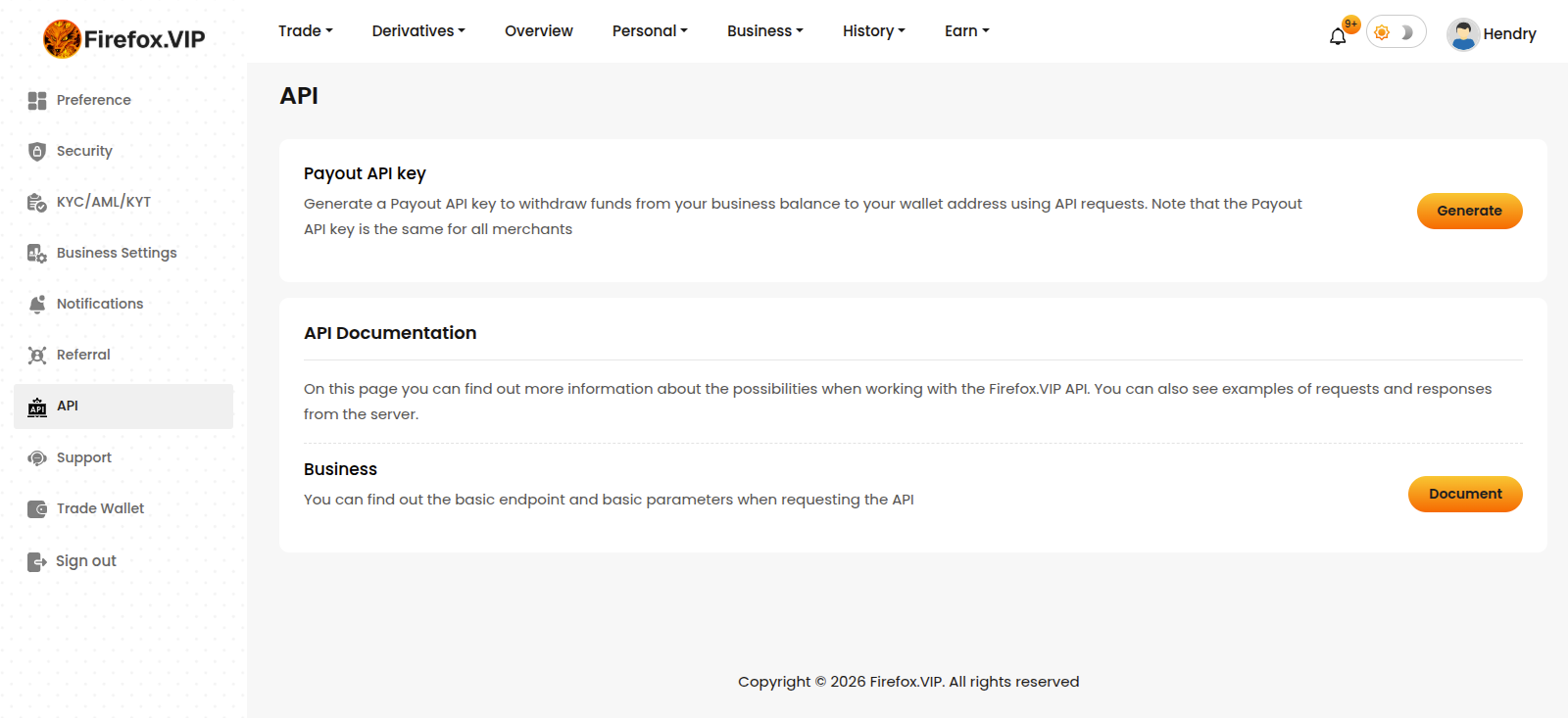
4. Generate - Payout key (Remember withdrawals will be temporarily blocked for 24 hour after generate new payout API key).
5. Copy your payout API key.
6. Done!
Payment statuses
The payment status comes in the response body of some methods and indicates at what stage the payment is at the moment. All possible payment statuses can be viewed below.
Response
Response parameters
List of services
Returns a list of available payment services. Payment services store settings that are taken into account when creating an invoice. For example. currencies, networks, minimum and maximum limits, commissions.
POSThttps://siteapi.firefox.vip/payment-services
Request
Query parameters
No parameters
Request example
curl https://siteapi.firefox.vip/payment-services \
-X POST \
-H "merchant: 870b646d79ety663c8d66cc82c489738" \
-H "sign: 60458ed7901293c6519e4b38c4f997b469167ad61b31346537155b6f5188b7239bdggd" \
-H "timestamp: 1771823631014" \
-H "Content-Type: application/json" \
-d '{}'
Response
Response parameters
Response example
{
"success": true,
"message": "Payment services fetched successfully",
"data": [
{
"currency": "BTC",
"network": "BTC",
"is_available": true,
"limit": {
"min_amount": "0.00000001",
"max_amount": "100000000000.00000000"
},
"commission": {
"static_fee": "4.00000000",
"percent": "2.00000000"
}
},
{
"currency": "ETH",
"network": "ETH",
"is_available": true,
"limit": {
"min_amount": "0.00000001",
"max_amount": "100000000000.00000000"
},
"commission": {
"static_fee": "2.00000000",
"percent": "2.00000000"
}
}
]
}
Refund
POSThttps://siteapi.firefox.vip/refund
Request
Query parameters
*- mandatory parameter
Invoice is identified by payment_id or merchant_id, if you pass both, the account will be identified by payment_id
Request example
curl https://siteapi.firefox.vip/refund \
-X POST \
-H "merchant: 870b646d79ety663c8d66cc82c489738" \
-H "sign: 60458ed7901293c6519e4b38c4f997b469167ad61b31346537155b6f5188b7239bdggd" \
-H "timestamp: 1771823631014" \
-H "Content-Type: application/json" \
-d '{
"address": "bc1qxy2.....2493p83kkfjhx0w",
"payment_id": "BGPTGWY6PNH9M71XL93JVBM8AQR"
}'
Response example
{
"success": true,
"message": "Refunded successfully.",
"data": []
}
Possible error
Validation Error - Invalid Address: Returned when the provided address does not match the required format.
Response example
{
"success": false,
"data": {
"address": [
"The address is not a valid address."
]
},
"message": "Validation error"
}
Returned when the is_subtract field is not provided. This field determines whether the amount should be subtracted (1 = true, 0 = false).
Response example
{
"success": false,
"data": {
"is_subtract": [
"The is subtract field is required."
]
},
"message": "Validation error"
}
Returned when the payment has already been refunded.
Response example
{
"success": false,
"data": [],
"message": "Refund is being processed."
}
Missing Merchant Header: Returned when one or more required merchant headers are not included in the request.
Response example
{
"success": false,
"error": "Missing merchant header"
}
Refund payments on blocked address
POSThttps://siteapi.firefox.vip/blocked-address-refund
You can make a refund only once.
Request
Query parameters
*- mandatory parameter
Invoice is identified by payment_id or merchant_id, if you pass both, the account will be identified by payment_id
Request example
curl https://siteapi.firefox.vip/blocked-address-refund \
-X POST \
-H "merchant: 870b646d79ety663c8d66cc82c489738" \
-H "sign: 60458ed7901293c6519e4b38c4f997b469167ad61b31346537155b6f5188b7239bdggd" \
-H "timestamp: 1771823631014" \
-H "Content-Type: application/json" \
-d '{
"address": "bc1qxy2.....2493p83kkfjhx0w",
"payment_id": "BGPTGWY6PNH9M71XL93JVBM8AQR"
}'
Response example
{
"success": true,
"message": "Refunded successfully.",
"data": []
}
Possible error
Validation Error - Invalid Address: Returned when the provided address does not match the required format.
Response example
{
"success": false,
"data": {
"address": [
"The address is not a valid address."
]
},
"message": "Validation error"
}
Returned when a refund is attempted again for a blocked static wallet that has already been refunded.
Response example
{
"success": false,
"data": [],
"message": "Refund is only allowed once for the Block Static Wallet."
}
Missing Merchant Header: Returned when one or more required merchant headers are not included in the request.
Response example
{
"success": false,
"error": "Missing merchant header"
}